%20-%20Teams%20Logo.png?width=576&height=182&name=Logo%20in%20standard%20arrangement%202%20(RGB)%20-%20Teams%20Logo.png "Epic Fusion")

Many companies rolled out Microsoft 365 Copilot, built the first agents in Copilot Studio, and at the same time employees use ChatGPT, Claude and other tools on their own. AI is spreading faster than most governance processes can follow. That is not good. So what can be done? One option is to use the three key Microsoft building blocks for AI governance: Microsoft Purview for data, Microsoft Agent 365 for agents, and Microsoft Entra Global Secure Access for the network. We will show you which tool addresses which risk.
Why do we need AI Governance?
When we talk to customers about AI, the concerns are almost always the same three:
-
Data leakage: A user pastes customer data into a public chatbot, or Copilot surfaces a document that was never protected correctly.
-
Uncontrolled agents: Everyone can build an agent today. But who owns it? What can it access? Who turns it off when the owner leaves the company?
-
Shadow AI: Employees use AI tools that IT has never heard of. You cannot protect what you cannot see.
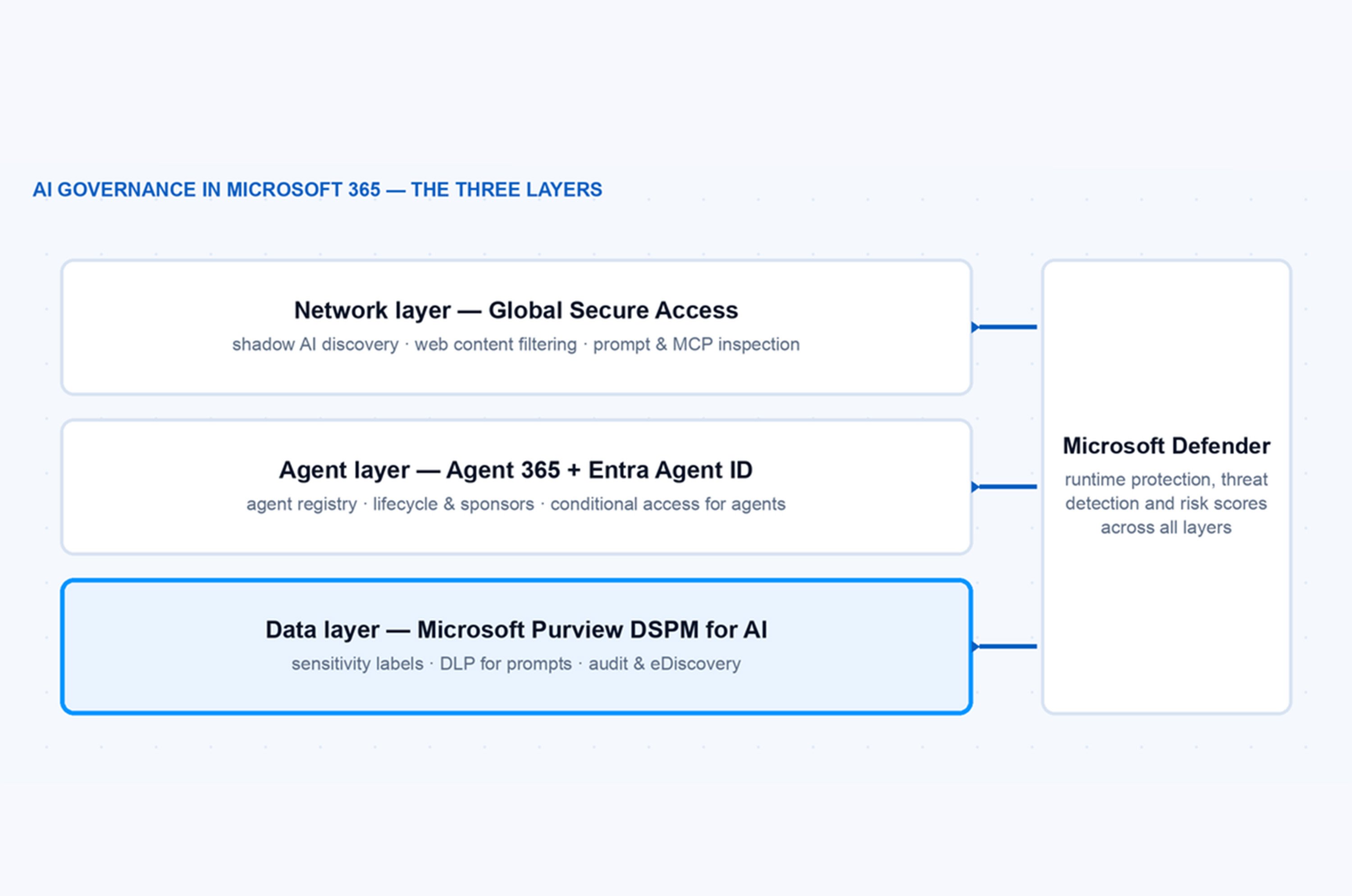
And there is a fourth driver that is becoming more important every month: regulation. The EU AI act is being enforced step by step, and auditors start asking very concrete questions: which AI systems do you use, who is accountable for them, and how do you prevent sensitive data from flowing into them? «We have a policy document» is not a good answer to that. You need technical controls, and you need an inventory. No single product solves all of this. That is the important mental model: AI governance in the Microsoft world is not one tool, it is three layers: the data layer, the agent layer and the network layer. Microsoft Defender sits across all three of them.
What is Microsoft Purview DSPM for AI?
Microsoft Purview Data Security Posture Management (DSPM) for AI is the front door for the data layer. You find it in the Purview portal, and it answers the question: what sensitive data flows into and out of AI apps in my tenant?
The most important capabilities in practice:
Discover AI interactions
DSPM for AI shows you prompts and responses for M365 Copilot, agents and also third-party AI apps. You see which sensitive information types show up in AI interactions, broken down by app and by user. This report turns an abstract discussion into concrete numbers.
Sensitivity labels do the heavy lifting
If a document has a label without the EXTRACT usage right, Copilot and agents are not allowed to use its content in a response. This is the single most effective control – but it only works if your labels are actually deployed. A label taxonomy that exists only in a diagram protects nothing.
DLP for prompts
Data loss prevention can now check the prompt itself. If a user tries to paste credit card numbers or source code into an AI app, the policy can block it before it leaves the tenant. Prompt-based DLP with sensitive information types is generally available since March 2026, and the nice part: it does not require an E5 license. E3 with Copilot is enough.
DLP in the browser
Edge for business can block sensitive data in real time when a user types it into ChatGPT, Google Gemini or DeepSeek. This closed a big gap, because most shadow AI usage happens in the browser, outside of everything your M365 DLP policies could see before.
Audit, retention and eDiscovery
AI interactions are written to the unified audit log, can be put on hold and are searchable in eDiscovery – like emails and Teams chats. Your legal team will ask for this sooner or later, and it is much easier to have the data from day one than to explain why the first six months are missing.
A part that is easy to overlook: DSPM for AI also ships oversharing assessments. The assessment scans your SharePoint landscape and shows where Copilot can read far more than it should – the classic «Everyone except external users» permission on a site with salary lists. Copilot does not create permission problems, it exposes the ones you already have. Fixing oversharing is boring work, but it is the foundation for everything else.
Hint: Run the oversharing assessment before you extend Copilot or agents to more users. Every AI rollout amplifies existing permission problems, and cleaning up afterwards under time pressure is no fun.
One more thing worth knowing: Agents built in Microsoft Copilot Studio inherit these protections. Purview applies sensitivity labels, DLP and audit to agent interactions the same way it does for Copilot itself. So the data layer does not stop at the chat window – it follows the data into the agents.

What is Microsoft Agent 365?
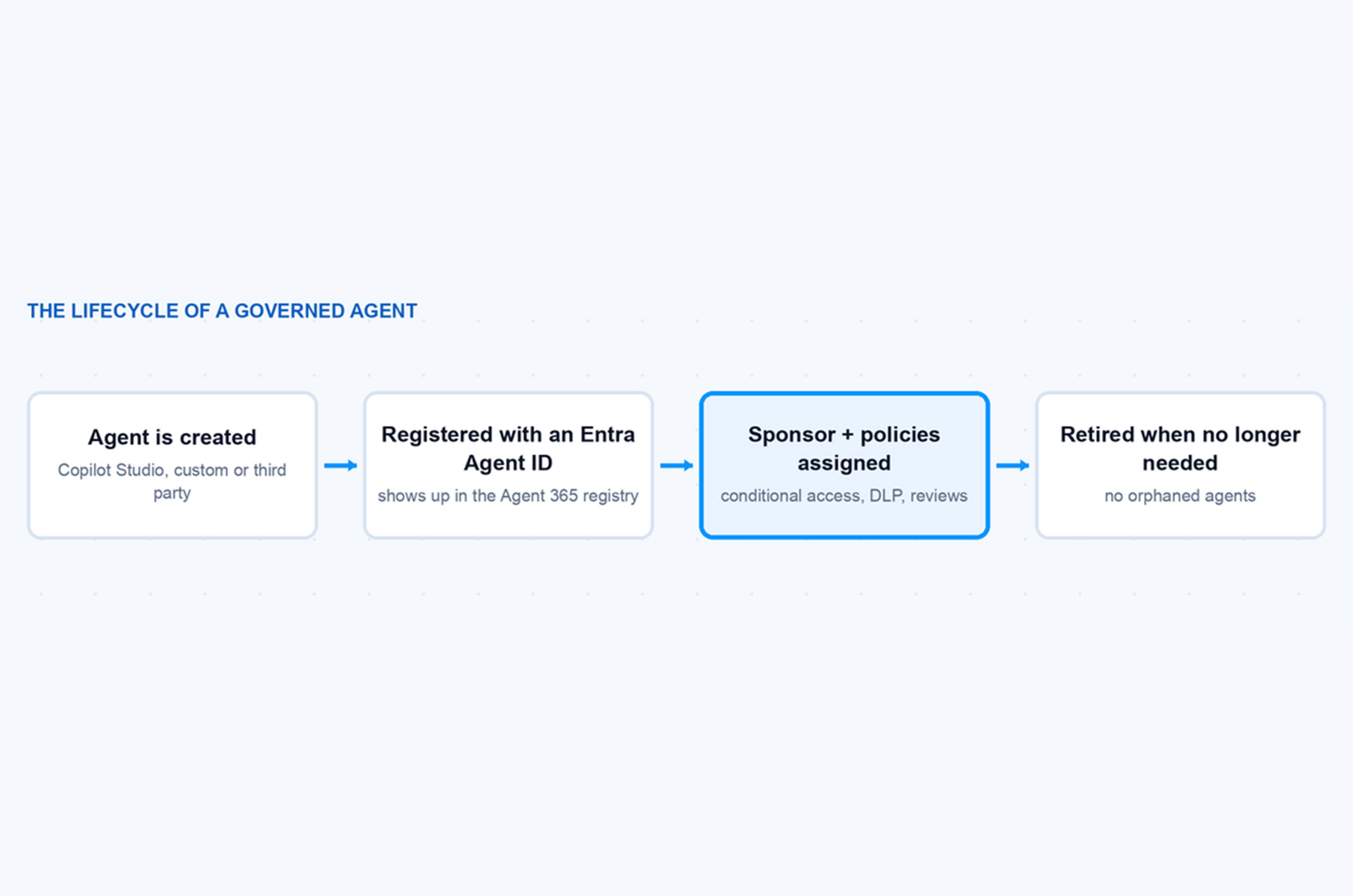
Microsoft Agent 365 is the control plane for the agent layer. It became generally available on May 1, 2026 as a per-user add-on (15 US dollars per user and month at list price) and is also part of the new Microsoft 365 E7 suite. The idea is simple: Treat agents like employees. They get an identity, an owner, a lifecycle and security policies. Agent 365 is built on three pillars:
-
Observe. A central agent registry in the Microsoft 365 admin center shows all agents in the tenant – Copilot Studio agents, custom agents built with Microsoft Foundry, and pre-integrated third-party agents that you can deploy directly from the admin center. The Agent Map goes one step further and visualizes how agents connect to users, data sources and other agents. When an agent misbehaves, this is where you see the blast radius.
-
Govern. Lifecycle management, access control and compliance in one place. Admins can approve, block or retire agents, and scheduled reviews make sure permissions stay appropriate over time. This is the part that answers the auditor question «which AI systems do you run and who is accountable?» with a report instead of a shrug.
-
Secure. The existing security stack is extended to agents: Microsoft Entra enforces conditional access for agents, Microsoft Purview applies DLP and information protection to agent interactions, and Microsoft Defender detects risky agent behavior at runtime and can block unsafe actions.
Note: Since May 2026 the agent registry lives in the Microsoft 365 admin center under Agent 365. The older registry pages in the Entra portal were retired. If you looked at this during the preview, check the new location.
What is Entra Agent ID?
The identity piece underneath Agent 365 is Microsoft Entra Agent ID, which reached general availability in April 2026. Every agent gets its own identity in Entra comparable to a user account, but for a piece of software that acts on its own. That unlocks the whole identity toolbox for agents:
-
Conditional access: An agent can be restricted to certain resources, locations or risk levels, exactly like a user.
-
Risk detection: Entra ID Protection evaluates agent sign-ins and can block an agent that suddenly behaves differently.
-
Identity governance: With access packages you define which permissions an agent gets, and access reviews check regularly whether it still needs them.
-
Sponsors: Every agent gets a human sponsor who is responsible for it. When the sponsor leaves the company, the lifecycle workflow catches the orphaned agent instead of letting it run forever with nobody watching.
The sponsor concept sounds like a small feature, but in my opinion it is the most important one. The biggest agent risk in real projects is not a hacked agent. It is the forgotten agent that a colleague built two years ago, that still has write access to a mailbox, and that nobody remembers.
What is Global Secure Access doing for AI?
Microsoft Purview protects the data and Agent 365 governs your own agents. But what about the AI tools you do not own? That is the network layer, and this is where Microsoft Entra Global Secure Access comes in – specifically Entra Internet Access, which now works as a Secure Web and AI Gateway.
The relevant features:
-
Shadow AI discovery. Global Secure Access analyzes the network traffic of your users and detects connections to generative AI apps, AI model provider APIs (for example the Anthropic or DeepSeek APIs) and even SaaS MCP servers. The findings are matched against the Microsoft Defender for Cloud Apps catalog, so every discovered app comes with a risk score based on security, compliance and legal factors. You find the results under Global Secure Access → Applications → Insights and Analytics, with a filter for generative AI apps and tools. The dashboard also shows how much data flows to each app – bytes sent to an AI service is a very honest metric for data leakage risk.
-
Web content filtering. Once you know which AI apps are used, you can block or allow them by category or by individual app – enforced on the network, not just in the browser. A user who switches from Edge to another browser does not escape the policy.
-
Generative AI Insights. This is the deep end: with TLS inspection, Global Secure Access can log the actual prompt content and MCP operations sent to AI services. Shadow AI discovery tells you which apps are used, Generative AI Insights tells you what is sent to them. The two are designed to be used together – inventory on one side, payload visibility on the other.
-
Prompt injection protection and file filtering. Both are in public preview: malicious prompts can be blocked in real time at the network level, and network file filtering prevents confidential files from being uploaded to unsanctioned AI services.
The order matters here. Blocking AI tools on day one usually backfires. Users switch to their private devices and you lose visibility completely. The pattern I recommend is: discover first, assess the risk, offer a sanctioned alternative, and only then enforce.
Hint: Run shadow AI discovery in monitor mode for two weeks before you talk to management about AI policy. The list of tools that are actually in use is usually much longer than anyone expects, and it makes the budget discussion for sanctioned AI tools very short.
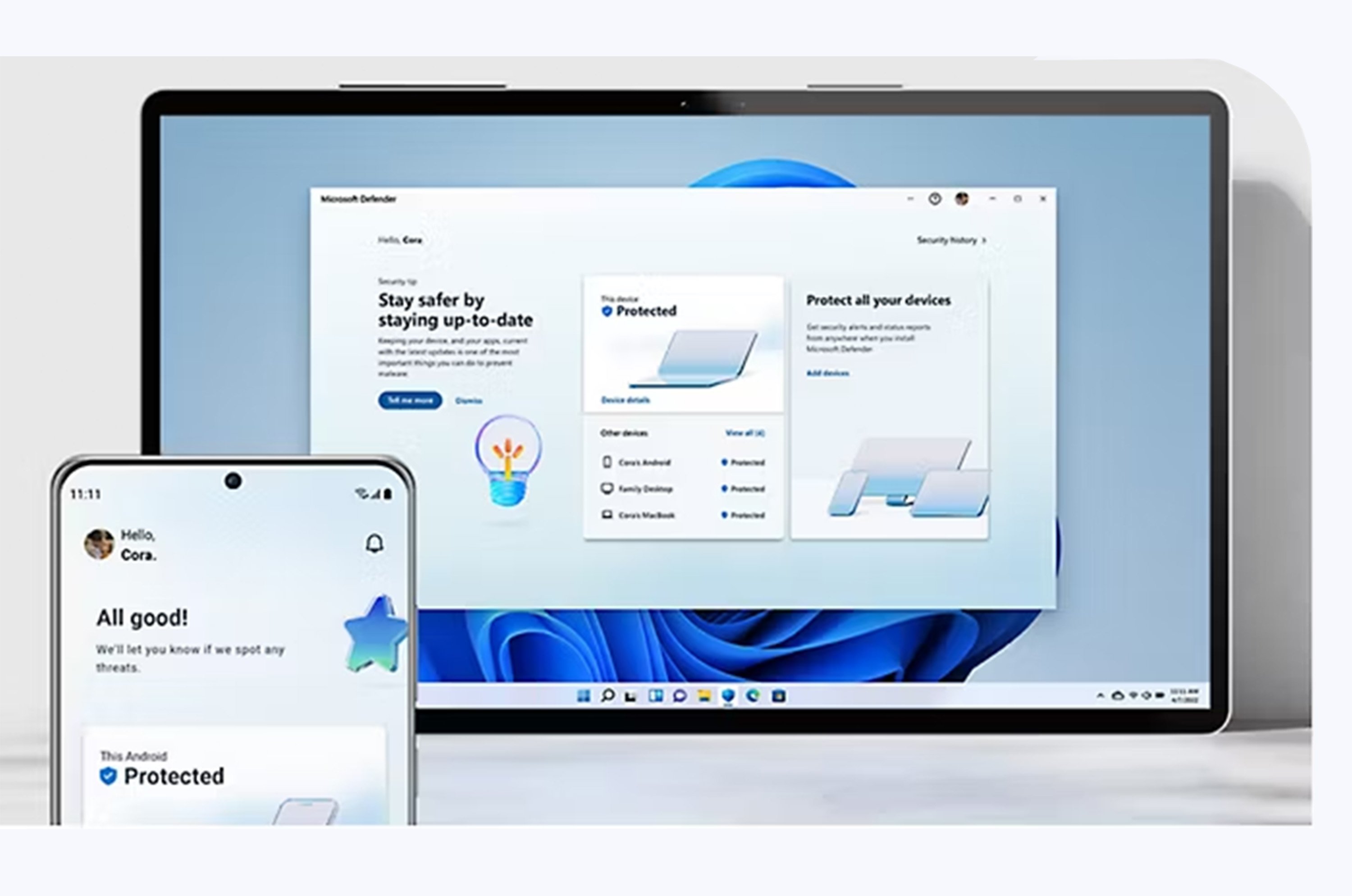
What is the Role of Microsoft Defender?
Microsoft Defender across all three layers:
-
On the data and app layer, Microsoft Defender for Cloud Apps provides the app catalog with risk scores that shadow AI discovery uses, and it can sanction or unsanction AI apps.
-
On the agent layer, Defender adds runtime protection: it watches what agents actually do, detects risky behavior like an agent suddenly accessing unusual resources, and can stop unsafe actions in real time.
-
On the workload side, Defender for Cloud covers AI workloads you build yourself, for example agents and models running in Azure. AI security posture management shows misconfigurations before they become incidents.
You do not manage Defender from the Agent 365 portal. The signals land in the Defender portal like every other incident. That is a good thing: your SOC does not need a new console for AI, agent alerts show up in the queue they already work with.
How do the three Layers fit together?
The graphic below shows a simplified overview.
The layers also reference each other. An agent found in the Agent 365 registry has an Entra Agent ID, its interactions show up in Purview DSPM for AI, and if it calls an external MCP server, Global Secure Access sees that traffic. That is the actual value of staying in one ecosystem here: the signals connect, and you can follow one agent through all three layers.
Recommendation for getting started.
If you are just starting out, we recommend the following order:
-
Purview first. Deploy sensitivity labels, run the DSPM for AI assessment and fix oversharing. Without this, every AI rollout amplifies existing permission problems.
-
Turn on auditing for AI interactions. It costs you nothing and you will need the history later.
-
Discover shadow AI. If you have Global Secure Access, enable the discovery and just look at the data for two weeks. The results are usually eye-opening for management.
-
Inventory your agents. Open the Agent 365 registry and check what is already there. Assign owners to every agent that has none.
-
Then enforce. DLP policies for prompts, conditional access for agents, web content filtering for the AI apps you decided against.
You do not need a big-bang project for this. Steps 1 to 4 are pure visibility. No user notices them, nothing breaks, and each one gives you a report you can put on the table.
Avoid the following Pitfalls.
-
Blocking before discovering. The fastest way to push AI usage to private phones, where you have zero visibility. Discover, offer an alternative, then block.
-
Treating labels as a side project. Every Purview AI control leans on sensitivity labels. If the label rollout is stuck at «pilot with 20 users since 2024», fix that first. Everything else builds on it.
-
Agents without owners. If you allow agent creation without a sponsor process, you will have orphaned agents within months. Turn on the sponsor and review workflows from the start, while the number of agents is still small.
-
Ignoring MCP traffic. Agents that call external MCP servers are a new data path that classic web filtering does not understand. Shadow AI discovery detects SaaS MCP servers. Look at that list, it is usually not empty.
-
Designing the target picture before checking licenses. Purview DSPM for AI needs E5 or Purview add-ons for most features (prompt DLP being the nice exception), Agent 365 is a separate per-user add-on, and Global Secure Access needs Entra Suite or a standalone Internet Access license. Check what you already own first. Often more is included than you think, and sometimes the missing piece changes the design.
-
Treating AI governance as a one-time project. New agents, new AI tools and new features arrive monthly. The reviews, the discovery dashboards and the DSPM reports only help if somebody actually looks at them. Put a monthly recurring task in the calendar and be done with it.
AI governance sounds like a big compliance project, but in the Microsoft world it breaks down into three manageable layers: protect the data with Purview, govern the agents with Agent 365 and watch the network with Global Secure Access. With Defender as the safety net across everything. You do not have to do it all at once, but you should start with visibility now, because the agents and the shadow AI are already in your tenant today.
