Skip to content
Microsoft Agent 365 Control Plane for AI Agents

Microsoft Agent 365: The Control Plane for AI Agents

Jannik Reinhard Knowledge

Microsoft Cowork marks the beginning of a new era: AI no longer just answers questions, but plans and completes tasks on its own.

Many companies are currently in the same situation: a few Copilot agents here, a Copilot Studio bot there. Someone on the data team built a LangChain agent, and a vendor tool quietly brought its own agents along. It works. But here’s the thing: no one has a complete list of what is running, what it is allowed to access, and who is responsible for it.

In this article, we will explain what Microsoft Agent 365 is, why you need it, and how the pieces fit together. Because Microsoft Agent 365 is Microsoft’s answer to this mess. It is a management layer for AI agents. A place to register, secure, and manage every agent in your organization, no matter who built it. Explained simply and practically for IT administrators responsible for managing enterprise AI.

What is Microsoft Agent 365?
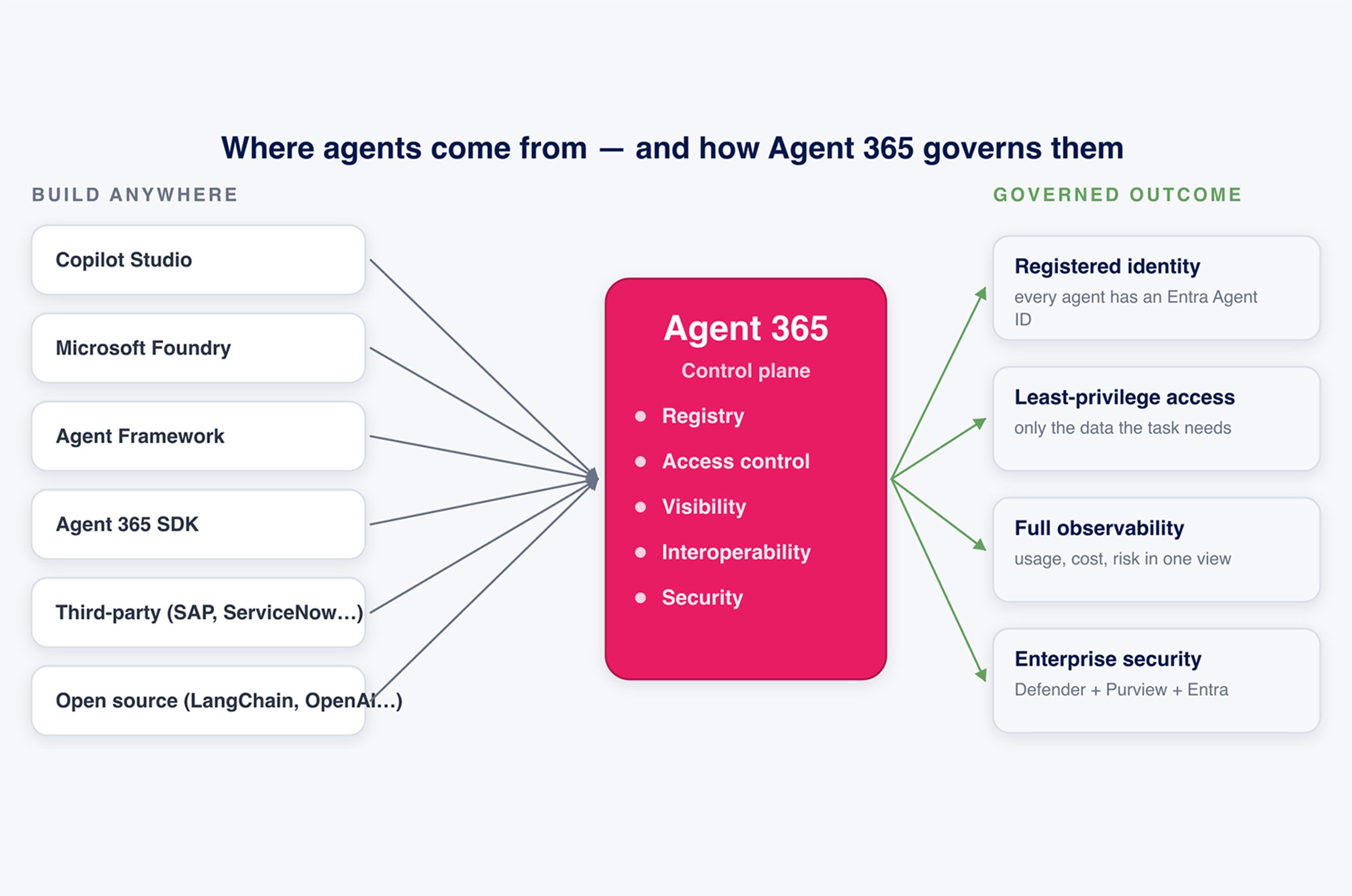
Think about how you manage people today. Every employee has an identity in Microsoft Entra. They only get access to the apps and data they need. You see what they are doing, and you can offboard them when they leave. Agents had none of that. They were scripts and bots running with borrowed permissions and no real owner. Agent 365 treats agents the same way it treats users. It builds on the systems you already run – Microsoft Entra, Microsoft Purview, and Microsoft Defender – and extends them to agents. You access it through the Microsoft 365 admin center, so it is not a new portal you have to learn from scratch.

The key concept is control plane. Agents can be built anywhere – Copilot Studio, Microsoft Foundry, Microsoft Agent Framework, Agent 365 SDK, even on a third-party platform like SAP or ServiceNow, or an open-source stack like LangChain. Agent 365 does not care where they come from. It gives everyone an identity, a set of rules, and a dashboard.

Microsoft Agent 365 Control Plane

Why do we need a Control Plane for AI Agents?

Because the numbers are about to grow exponentially. According to IDC, there will be 1.3 billion AI agents by 2028. Even a mid-sized company won't have just a handful of agents – it will have hundreds, then thousands. Some are authorized. Many are not.

That is the real problem: shadow agents. An agent launched by someone with access to a SharePoint site, a mailbox, or a customer database, which IT never approved and can not see. A user with too much access is a risk. An agent with too much access can automatically react to this risk, thousands of times per hour. A small side note: An agent is not just a chatbot. It can read data, call APIs, and act on your behalf. That is precisely why an uncontrolled agent is more dangerous than an uncontrolled script. Therefore, a control layer is not just a nice-to-have. As soon as you have more than a few agents, you must be able to answer three questions at any time:

  • Which agents do we have?

  • What is each one allowed to do?

  • Is any of them behaving inappropriately?

Agent 365 will help you answer these three questions.

The five Core Capabilities of Microsoft Agent 365.
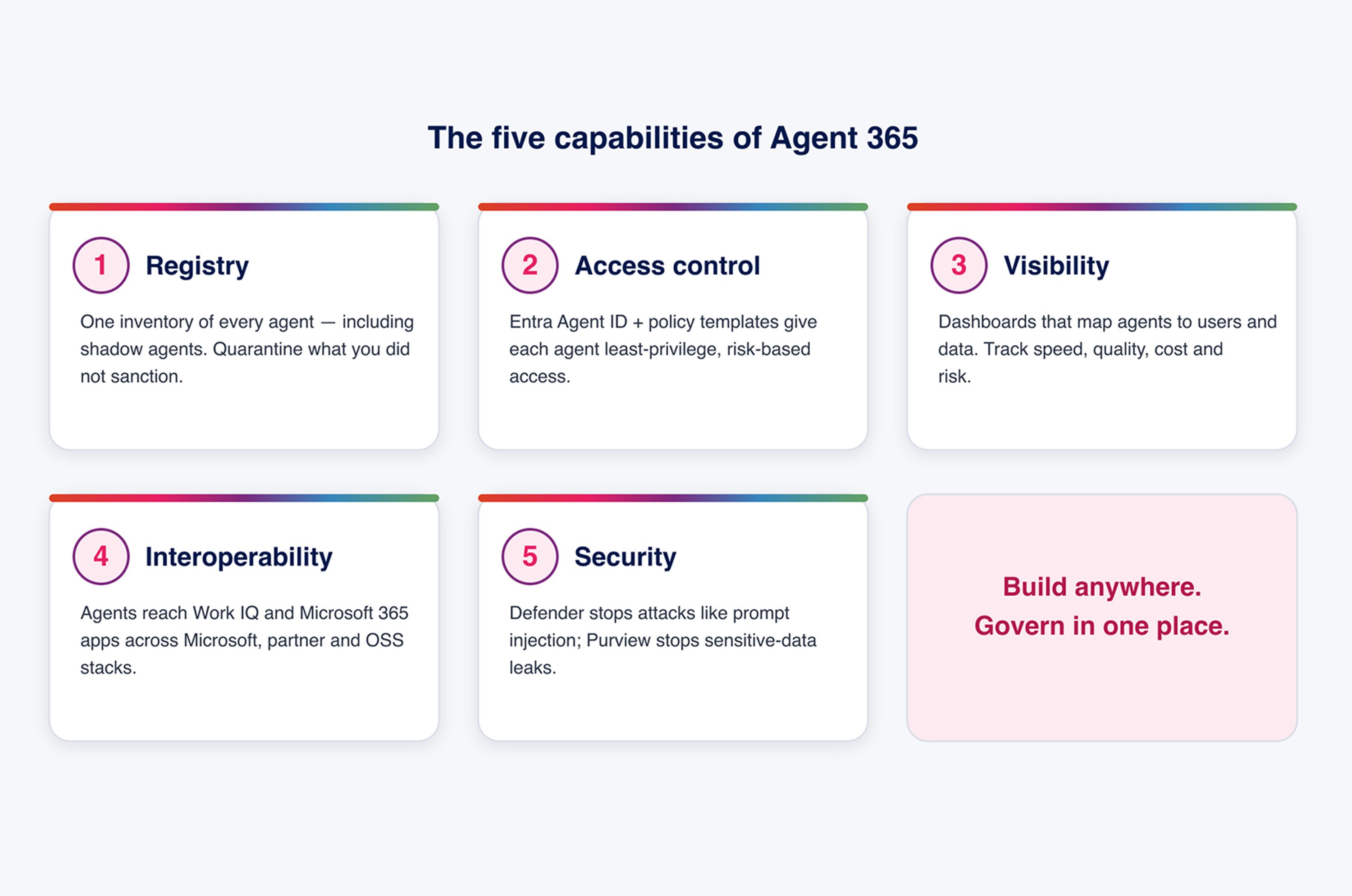
Microsoft Agent 365 groups its functionality into five core capabilities:

  • Registration

  • Access

  • Control

  • Visibility

  • Interoperability

  • Security

These five pillars provide an easy way to remember its purpose, as each one maps to a responsibility that IT administrators already manage for human users today.

Microsoft Agent 365 five Capabilities

1. Registration – a single Inventory of All AI Agents.
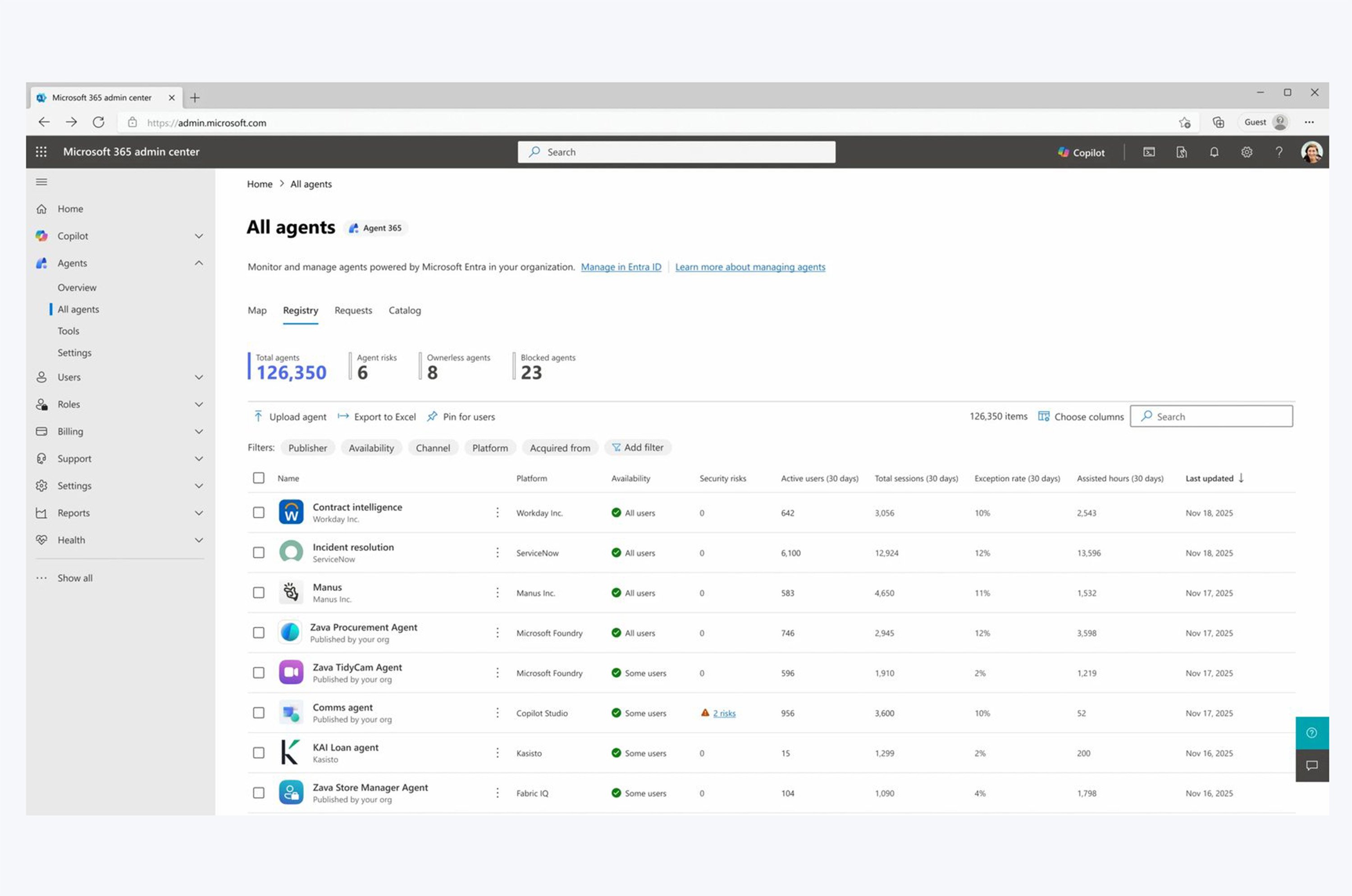
Registration is the foundation. It uses the Microsoft Entra Registry to maintain a list of every agent in your organization: custom-built agents, agents from the Microsoft Teams Store, and (soon) shadow agents that have never been registered. Below you can see the All agents view in the Admin Center. This shows every agent with its owner, usage, and security status. If you find something you haven't authorized, you can quarantine it directly from there. This registry becomes the «Single Source of Truth» on which everything else is built.

Microsoft Agent 365 Registration Platform

2. Access Control – applying least Privilege to AI Agents.
Each agent receives a unique Entra Agent ID. That is the core concept. Once an agent has its own identity, you can treat it like any other principal: grant it least-privilege access, apply risk-based conditional access, and use policy templates so you do not have to manually build rules for each individual agent.

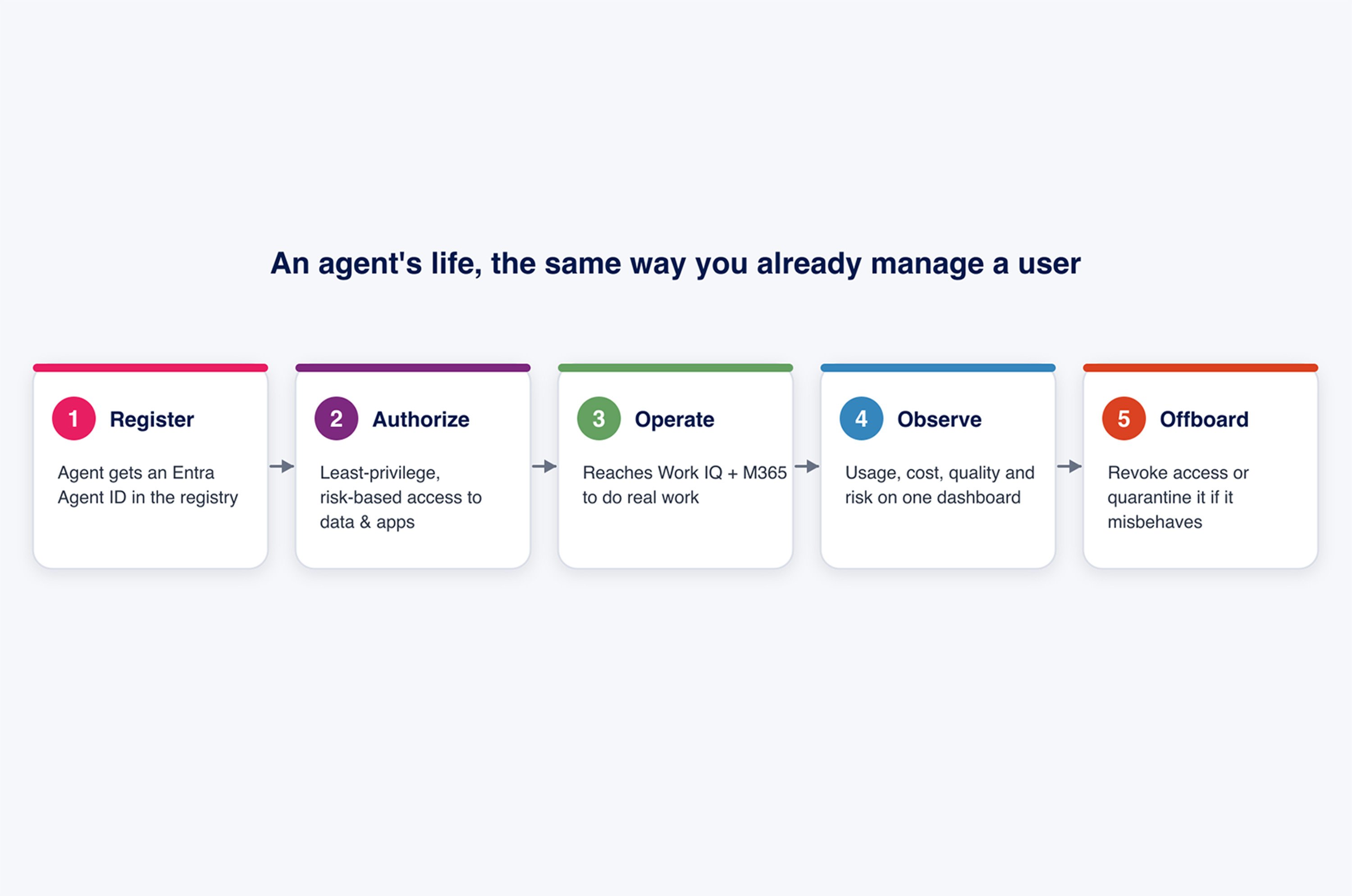
Below you can see the Microsoft Agent 365 agent lifecycle: register with an Entra Agent ID, authorize least-privilege access, operate, monitor, and deactivate or quarantine. You can think of an agent's life cycle much like a user's: register, authorize only what is necessary, operate, monitor, and deactivate or quarantine if it misbehaves. None of this is new. It is the identity lifecycle you have already been using, but applied to agents.

Tip: The principle of least privilege is even more important for AI agents than for people. An agent will use every permission you grant it – consistently, automatically, and at machine speed. Give it only the permissions required to perform its intended task.

Microsoft Agent 365 agent lifecycle

3. Visibility – keeping your entire AI Agent Fleet in View.
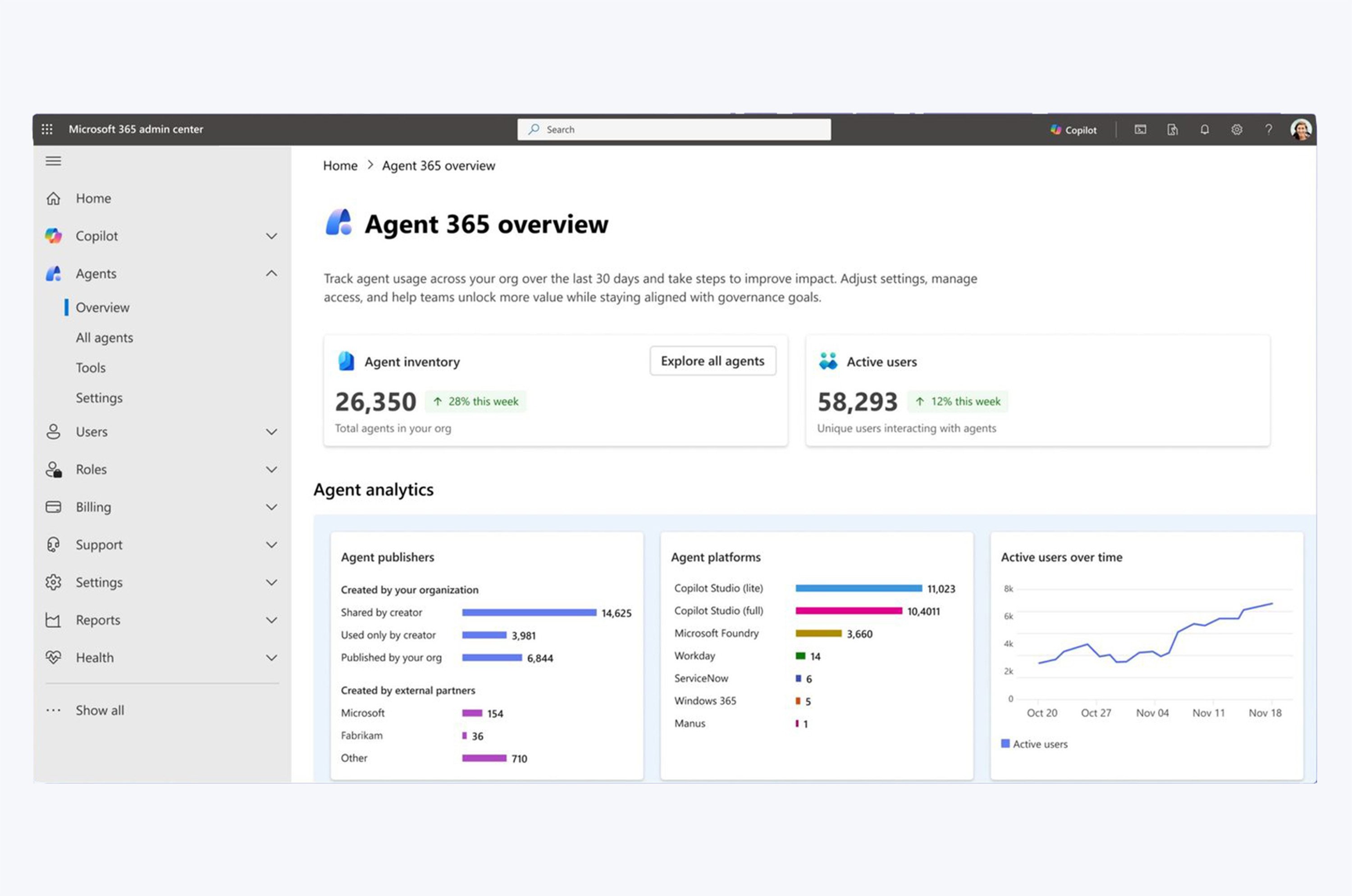
You ca not control what you ca not see. Agent 365 provides centralized dashboards that map the connections between agents, users, and data, plus role-based reports for IT, security, and business departments.

Here you see the Agent 365 overview in the Admin Center. You can see the total number of agents, how many people interact with them, which platforms they are running on, and how usage evolves over time. For business stakeholders, soft metrics like speed, quality, and ROI are also tracked, ensuring agents are not just a cost center with no tangible value. Detailed logging and e-discovery are there for compliance.

Microsoft Agent 365 Visibility and Overview

4. Interoperability – Agents that actually get Work done.
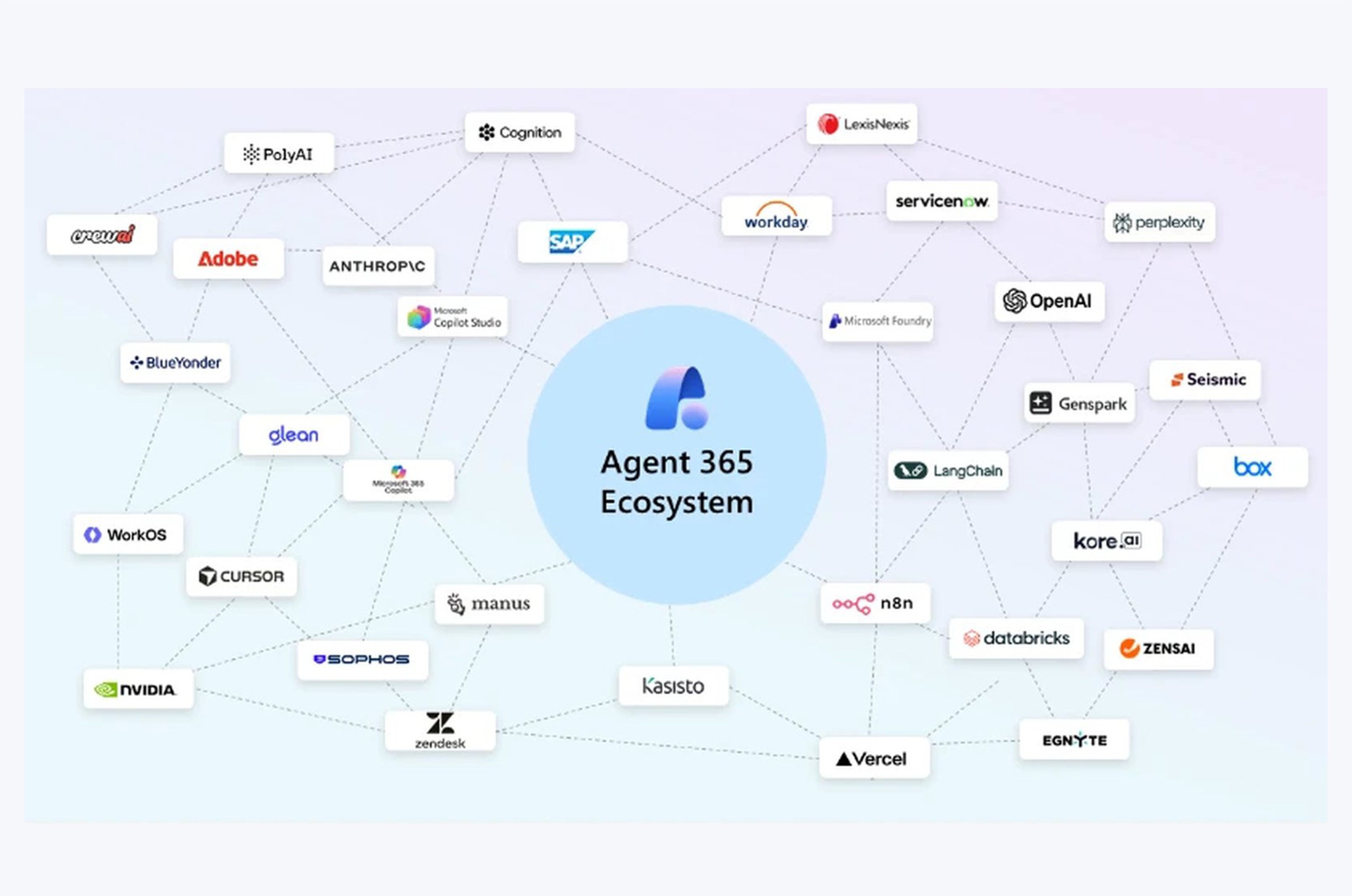
Governance is worthless if it locks agents out of the real work. Agent 365 gives agents access to Work IQ – the intelligence layer that understands your organization's data, relationships, and context. And to the Microsoft 365 apps people already use: Word, Excel, SharePoint, and Dynamics 365. And it is truly open. Agent 365 works with agents from Microsoft, partners like Adobe, SAP, ServiceNow, and Workday, and open-source frameworks like LangChain and OpenAI. You do not have to rebuild everything on a single platform to make it governable.

Microsoft Agent 365 Ecosystem

5. Security – the same Enterprise Security Stack, now for AI Agents.
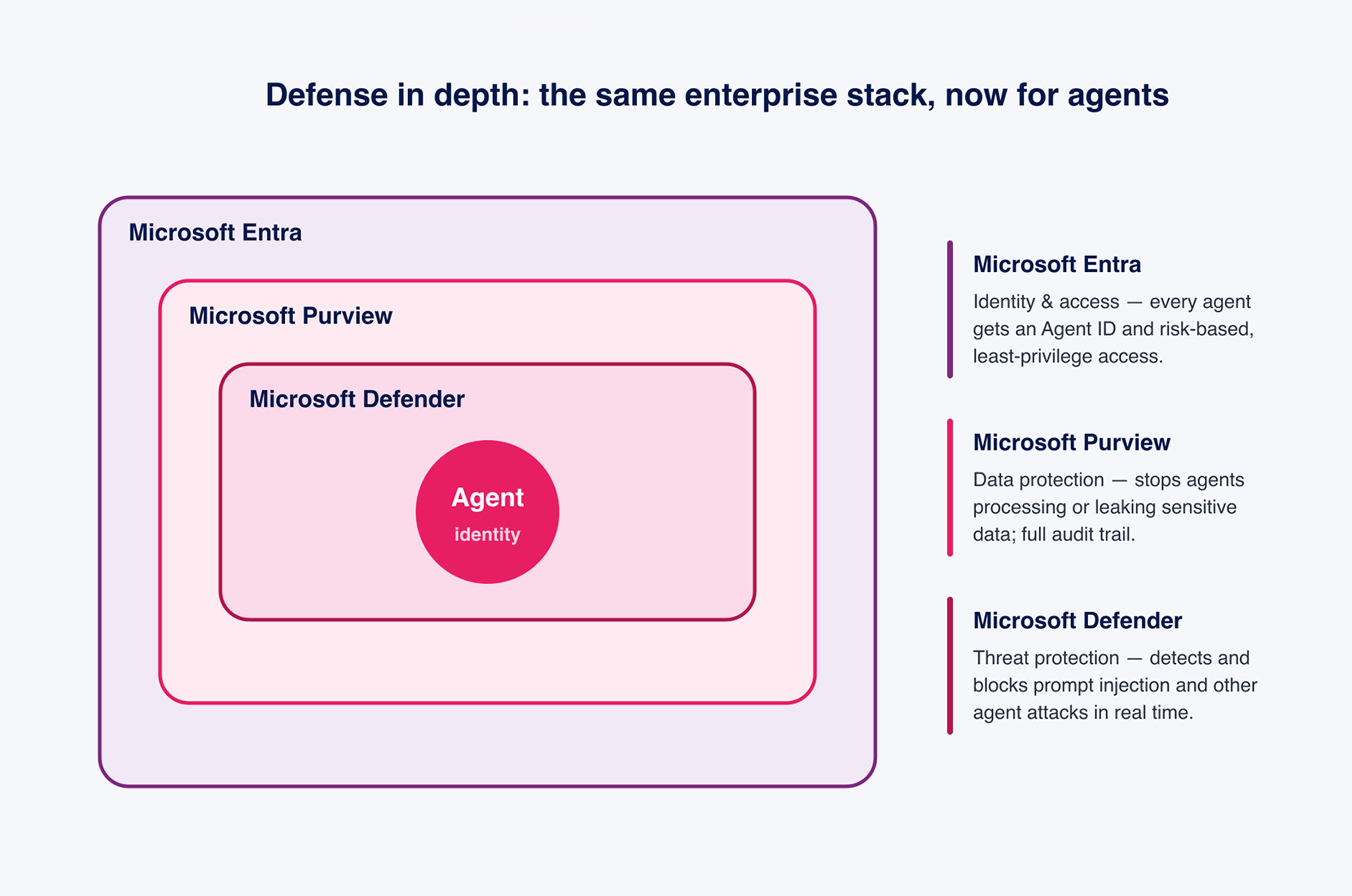
Security in Agent 365 is a defense-in-depth model built on three products:

  • Microsoft Entra handles identity and access: the agent ID and the least-privilege rules from Capability 2.

  • Microsoft Purview handles data: it prevents agents from processing or leaking sensitive information and maintains a full audit log.

  • Microsoft Defender handles threats: it detects and blocks agent attacks, including prompt injection, in real time.

Why is this important? Agents represent a new attack surface. A prompt injection attack can trick an agent into revealing data or performing an action they should not. Adding a separate security tool just for agents would be a nightmare. Reusing Entra, Purview, and Defender means your existing policies and your security team's routines are seamlessly integrated.

Microsoft Agent 365 Security and Defense in depth

How much does Agent 365 cost and how do I get it?

Agent 365 was announced at Microsoft Ignite in November 2025 and has been generally available since May 1, 2026. It costs around $15 per user per month. If you want the latest preview features before they are released, you can sign up for the Microsoft Frontier Program. However, be aware that these preview features do not come with production service-level agreements (SLAs), so keep them out of critical workflows.

Note: Work IQ, the intelligence layer that agents use for interoperability, has its own usage-based billing via Copilot Credits. Factor this in separately when estimating costs.

Epic Fusion Trennlinie_pink_Brand Accent 3

Recommendations for getting started with Agent 365.

Here is the order we recommend:

  • Enable the registry and just take a look. Before you make any changes, get the complete inventory. You will almost certainly find agents you did not know existed. This list alone is worth the effort.

  • Take care of the shadow agents. Quarantine anything that is not authorized and then decide on a case-by-case basis: approve and register, or disable.

  • Give each retained agent an owner and least-privilege access. No agent without a human owner. No agent with more access than its job requires.

  • Wire up Purview and Defender before you scale. Put data protection and threat detection in place while the number of agents is still small and manageable.

  • Then let the teams build. Once the guardrails are in place, opening Copilot Studio and the Agent Framework is much less intimidating.

Dividing Line in Epic Fusion Pink

Avoid these pitfalls.

Treating it as one big project.

  • Treating AI agent governance as a one-time project is a mistake. Governance that you set up once and then forget quickly becomes outdated. New agents appear every week. Review the Agent Registry on a regular schedule. Not just once.

  • Over-permissioning «just to make it work.» The fastest way to get an AI agent up and running is to grant it broad access. It is also the fastest way to create a data leak. Resist the temptation.
  • Ignoring shadow agents because they are inconvenient. The agents you haven't approved are the ones most likely to cause damage.

  • Forgetting the cost. Between user licenses and work IQ consumption, agents generate a significant bill. Track the ROI from day one, not just when the finance department asks.

Outlook: Where is this heading?

AI agents will become a normal part of the workforce, and they will require the same governance that we already provide for people. If you are already using Entra, Purview, and Defender, you are almost there – Agent 365 simply extends these capabilities to a new type of identity. For the official details and setup documentation, Microsoft's Agent 365 Overview on Microsoft Learn is the right place to start.


Jannik Reinhard, Head AI

Want to discuss this?

Get in touch with me. Just send me a message.
